
Browse abandonment email flow
Design browse abandonment messages using valid signals, identified users and rules that prevent overlap.
 By Dídac Anton
What a browse abandonment email can help with
A product-page visit may end because a question remains unanswered, the person is comparing options or they have not decided yet. A browse abandonment email follows up on that interest when sufficient information is available. Its role is to help the person move forward without treating a visit as a commitment to buy.
This differs from cart or checkout recovery. Browsing may involve no saved selection and no payment process. Avoid wording such as “Complete your order” when all you know is that a product was viewed. A link explaining its features may be more appropriate.
Instead of starting with a template, write down the question your store can answer after the visit. Without a specific answer, an automated reminder does not become useful simply by being automated. The method below covers data, content, priorities and testing.
An identifiable visit does not mean every visitor is known
Klaviyo uses Viewed Product for this flow and needs activity linked to an identifiable visitor. Collection can also depend on privacy settings. Check your integration’s documentation before assuming coverage.
Separate three questions in your review: does an event exist, can it be linked to the correct contact, and can that contact receive the intended message? Resolving one does not automatically resolve the others. This distinction avoids promising email recovery for everyone who visits the store.
A useful record explains why someone entered: which product was viewed, when it happened and which rule allowed entry. Treat missing data as a limitation to investigate. Do not fill gaps by attributing intentions, permissions or identities that the system does not confirm.
For a Shopify store, include the connection and privacy configuration in the scope of the Shopify email marketing integration. For other platforms, use the corresponding documentation. Keep decisions about the visitor experience, collected data and marketing sends separate.
Example: helping someone choose a backpack
Imagine a backpack store that often receives questions about dimensions, compartments and laptop compatibility. An identified person views a model and leaves. A message could bring back that product with a useful question: “Is it the right size for you?”. The body would show the correct model and link to its verified dimensions.
The next step should be easy to understand. “See dimensions and compartments” explains the destination better than a generic button. A comparison guide can help choose between models if the store has one; if not, the email should not promise it. First create or identify the resource that makes the message valuable.
Do not present follow-up as detailed surveillance. The content does not need to list how many times someone visited a page or describe private behaviour to be relevant. It can focus on the product and available help. Editorial precision means selecting a useful explanation, rather than proving how much data you hold.
A discount does not answer a sizing question by itself. Before offering one, decide which barrier it addresses and how you will evaluate it. For a compatibility question, a verifiable answer may be the most direct intervention. Email copy and design should preserve that priority across the subject, blocks and links.
| Unanswered question | Possible content | Editorial check |
|---|---|---|
| Dimensions or compatibility | Technical details or a fit guide | It applies to the model shown |
| Differences between options | A feature comparison | Relevant limitations are not omitted |
| Intended use | A documented usage example | The product can fulfil that use |
| Purchase conditions | Access to delivery, exchanges or help | The page is current and clear |
Prioritise the most recent and relevant behaviour
Someone may view one backpack, add another to their cart and buy a third product. Poor coordination could produce three incompatible messages. Define what changes as activity progresses: which journey continues, which stops and which selection appears. Write these decisions down before adding branches.
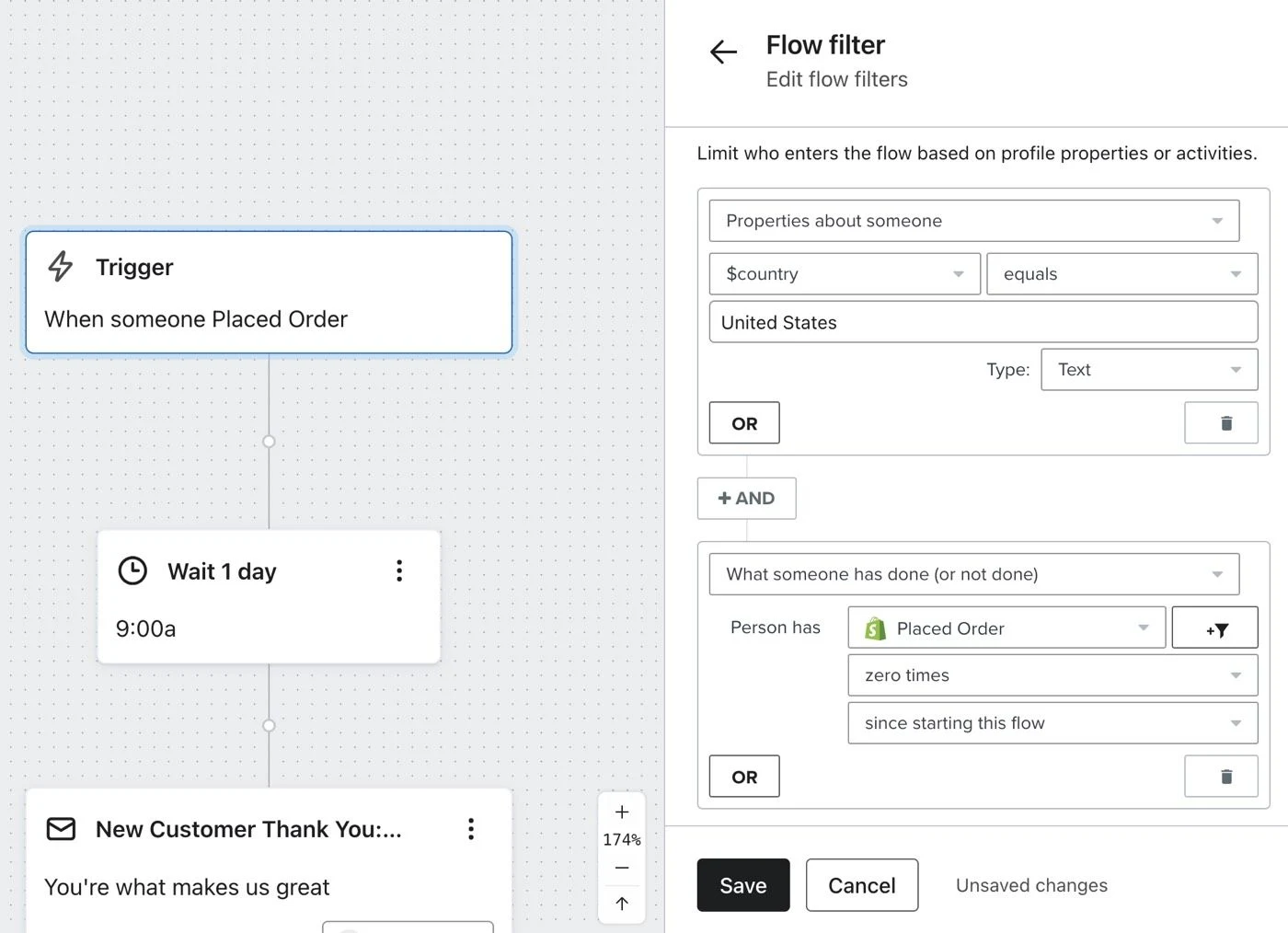
Avoid a rule that merely looks right on a diagram. Test it with a concrete story: the same person views two products, starts checkout and completes a purchase. Check which messages remain pending and which product each displays. The result matters more than the condition’s name.
Also decide how to handle a new visit after the message has been received. If every view creates another sending opportunity without a re-entry policy, the contact may face pressure nobody intended. The policy should express a justified, reviewable limit, rather than a number retained because it came with a template.
Segmentation by interest and purchase history can help when it creates a specific difference. For example, someone who already owns a model may need a comparison with its replacement, whereas someone with no purchases needs an introduction to the category. Do not create segments that ultimately say the same thing.
Test the complete story, not only the preview
Use a test record with a known identity, product, language, actions taken and expected result. Start in the store, verify the incoming data and continue to the page linked from the email. Include a second run with changed behaviour. That reveals whether the intended priorities actually apply.
Check content failures too. A product may become unavailable, change variant or move to another URL. Define the expected outcome instead of allowing a message to send an empty selection. If you cannot maintain a reliable recommendation, narrow the sequence’s scope until you can.
Before activation, agree who will investigate an anomaly. The person reviewing design may not be able to fix a missing event, and the integration owner may not know catalogue conditions. A named owner for each dependency helps solve the problem without exchanging context-free screenshots.
Acceptance cases
- Identifiable, eligible visit: the expected product appears and the link works.
- Insufficient visit data: identity is not invented and a send is not forced.
- Several product pages viewed: the displayed selection follows the agreed rule.
- Progress to cart or checkout: follow-up coordinates with the relevant recovery journey.
- Later purchase: messages contradicting the new situation do not continue.
- Repeated visits: re-entry respects the team’s defined limit.
- Unavailable product or different language: the message and destination remain coherent.
Assess usefulness, coverage and sending pressure separately
If few people enter, investigate data coverage and eligibility first. If people enter but nothing sends, review conditions and exclusions. If the email arrives but the resource is not used, examine the content and destination. These are different problems; changing the subject line does not fix missing events.
Performance requires a clear denominator. Identifiable visitors, flow participants and message recipients are different populations. The email marketing KPI guide helps define the comparison before interpreting clicks or attributed orders.
Pay attention to rejection signals and the full set of communications a person receives. Browse abandonment adds to campaigns and other flows. To examine how sending pressure affects the channel, connect this review with email deliverability. One visit does not require following up indefinitely with someone who does not respond.
The final decision may be to expand a guide, correct the displayed product, simplify a branch or reduce sends. Keep the sequence when it provides specific help you can explain and verify. That is a more useful standard than increasing messages simply because more behaviours are available to trigger automations.
Sources and further reading
AI-assisted translation
Article by Dídac Anton. The English, German, Dutch and French versions were translated from Spanish with the help of AI.
Read the Spanish originalRecommended articles
Abandoned cart email sequence
Examples, logic and decisions for a relevant, measurable abandoned cart sequence that does not always rely on discounts.
Ecommerce email flows
A practical guide to selecting, connecting and prioritising email flows by customer stage and available data.
Shopify email marketing agency
Connect Shopify to an email strategy with validated data, markets and automations before launch.