
Ecommerce email deliverability consulting
Diagnose delivery and reputation issues, prioritise technical and operational fixes, and track progress with realistic expectations.
 By Dídac Anton
Email deliverability starts with locating the problem
Email deliverability work identifies what happens between sending and receipt. A message marked as delivered by your platform does not prove that it reached the primary inbox or that someone read it. A fall in opens alone is therefore insufficient to diagnose a spam problem.
Before changing the sender or template, define the symptom: which campaign or automation is affected, since when, for which recipients and at which mailbox provider. Keep sample messages, their identifiers and any available server response. This makes cases comparable and prevents different behaviours being treated as one incident.
A deliverability review should produce a documented diagnosis, assigned corrections and a way to verify them. When you cannot yet tell whether the issue concerns sending, content or journey configuration, an email marketing audit helps establish the scope.
Use symptoms to organise the investigation
The following table is a working framework. Each row identifies the evidence to seek first, rather than assigning a definitive cause. Check whether one provider is affected before extending the conclusion to your whole audience.
| Symptom | First check | Conclusion to avoid |
|---|---|---|
| Message is not recorded as sent | Campaign or flow status, recipient eligibility and skip reason | Claiming the mailbox provider sent it to spam |
| Server rejects the message | Response code and text, destination domain and time | Treating every bounce as the same problem |
| Sending is pending or delayed | Attempt timeline and provider response | Resending manually while the original may still be in progress |
| Message appears in spam | Received message headers and that mailbox’s context | Assuming every recipient has the same placement |
| Opens fall but clicks do not | Audience, measurement and provider mix changes | Concluding that the entire sending reputation has deteriorated |
| Unsubscribes or complaints rise | Recipient source, frequency and the message’s promise | Changing the design without reviewing the audience |
Keep an earlier comparison selected on the same basis. An overall average can hide a change in audience composition; review counts as well as rates and their denominators.
What to check in SPF, DKIM and DMARC
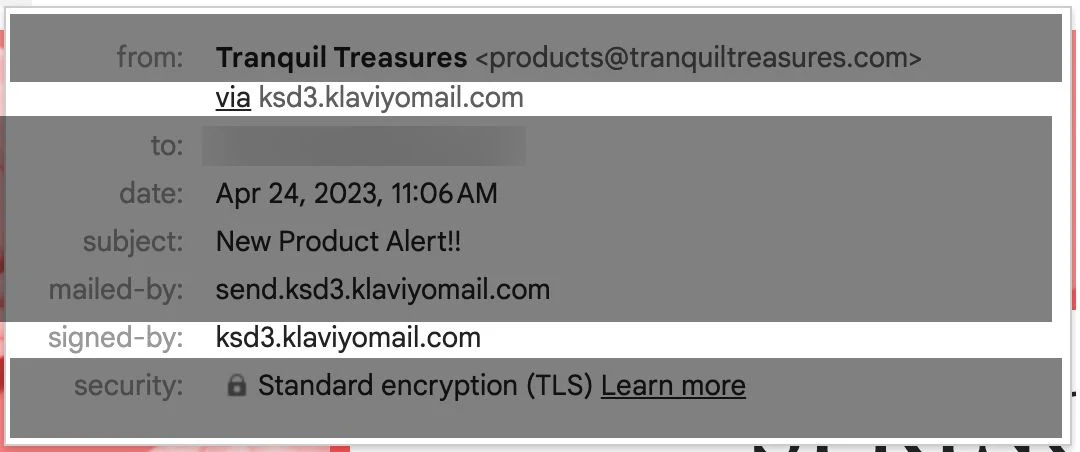
SPF authorises servers to use a domain when sending. Start with the domain actually being evaluated and the systems sending through it.
DKIM verifies a signature associated with a domain. Check a received message: a published record alone does not prove that this message is signed correctly.
DMARC checks alignment between the visible From domain and a domain authenticated through SPF or DKIM. It adds policies and reporting; authenticating a different domain does not establish alignment.
Gmail requires SPF, DKIM and DMARC for bulk senders to personal accounts. Its guidance recommends spam complaints below 0.1% and avoiding 0.3%; that ceiling is not a desirable target.
Inventory your sending systems before changing DNS: marketing platform, store, customer support and any other senders. Record an owner, domain and receipt test for each. A change intended for campaigns can also affect other company messages.
The technical handover should retain the previous value, the approved change and the result observed afterwards. Do not copy another store’s records or change policies blindly. If someone else manages DNS, request the specific change and then verify it using a message from the affected system.
Review contact origins and why people still receive messages
Authentication does not answer a basic question: does this person expect this message? Review the signup source, the promise made and the communication history. Analyse sources separately. Someone who recently requested updates has a different context from an old record with no known activity.
Contact segmentation should help decide who receives each send and who is excluded. Document the rule and inspect actual recipients. An “inactive” label does not itself prevent sending: the corresponding exclusion must be applied to recipient selection.
Klaviyo identifies opens associated with Mail Privacy Protection. Such an open does not establish human readership; combine signals and document what qualifies as activity in your analysis.
Before reactivating an old audience, check its origin and current contact states. List maintenance must distinguish stopping sends, changing a subscription and deleting a profile. Preserve the history needed to honour exclusions, and do not resubscribe opted-out contacts through an import.
For example, if a fictional campaign to older customers concentrates complaints, compare that group with recent subscribers and review the frequency it received. This supports a hypothesis about selection; it does not automatically establish that the advertised product caused the issue.
Test the visible and technical unsubscribe paths separately
RFC 8058 one-click unsubscribe uses List-Unsubscribe and List-Unsubscribe-Post headers and an HTTPS POST request. A footer link alone does not demonstrate that this mechanism is implemented.
Test unsubscribing with a test address and inspect its state afterwards. Then check that a subsequent campaign selection excludes it. Follow the whole behaviour rather than stopping at a page saying the unsubscribe succeeded.
The visible message should make the sender and reason for receiving it recognisable. Make opting out legible even with images blocked. A preference centre can offer alternatives, but leaving should not become a confusing journey.
Include this review in campaign management and reusable templates. If the platform or preference system changes, repeat the test instead of assuming that previous behaviour survives.
Build a correction plan with owners and decisions
A useful plan separates account changes from work requiring the technical team or provider. It identifies which sends need review, which remain operational and what evidence would justify widening the audience again. A recovery schedule cannot be promised before the issue is understood.
This worksheet is illustrative. Actions depend on the diagnosis and should be approved before execution.
| Area | Action to define | Completion evidence |
|---|---|---|
| Authentication | Correct the affected sender or record with the domain owner | Message from the right system with authentication results reviewed |
| Selection | Adjust the affected group and its exclusions | Verifiable recipient sample and inclusion reasons |
| Frequency | Coordinate campaigns and automations for the same audience | Calendar and journeys reviewed together |
| Provider incident | Submit a reproducible support case | Response, implemented change and recorded evolution |
| Monitoring | Agree criteria to continue, limit or stop a send | Decision log using comparable data |
If the issue appeared after an email marketing migration, also review changes in domains, selection and contact states. Switching tools again without reconstructing that transition leaves the same questions unanswered.
What deliverability monitoring should include
Agree an email metrics review that keeps definitions consistent. Separate provider, message type and audience when sufficient data exists. An overall improvement may reflect exclusion of the most problematic group; explain that alongside the result.
Monitoring does not end when a test email reaches your inbox. That verifies one case. Assess the trend using comparable real sends, document intervening changes and retain unresolved incidents.
- Initial diagnosis and scope of the data reviewed.
- Applied changes, dates, owners and previous configuration.
- Authentication results and relevant server responses.
- Trends by provider and audience, with counts and denominators.
- Unsubscribe and exclusion tests after significant changes.
- Next decision and the evidence still needed to make it.
Deliverability consulting should reduce avoidable problems and improve the team’s ability to diagnose them. Final mailbox placement also depends on the recipient’s system; it should not be sold as a guarantee of always reaching the primary inbox.
Sources and further reading
AI-assisted translation
Article by Dídac Anton. The English, German, Dutch and French versions were translated from Spanish with the help of AI.
Read the Spanish originalRecommended articles

Ecommerce email marketing KPIs
Understand what each KPI measures, how to calculate it and how to use it without confusing attribution with incremental impact.
Ecommerce email flows
A practical guide to selecting, connecting and prioritising email flows by customer stage and available data.

Ecommerce email marketing guide
A practical ecommerce email guide: what to build first, how the pieces connect and what to measure at each stage.