
PrestaShop email marketing agency
Connect PrestaShop to email while accounting for modules, languages, currencies and data quality.
 By Dídac Anton
PrestaShop email marketing: define scope before the module
Start by deciding which stores, customers and communications the project covers. A multilingual setup needs more than translated templates: links, catalogues, prices and entry conditions must match the recipient’s context.
Klaviyo’s documentation describes a PrestaShop module plus a connection in Klaviyo. The connection process includes choosing which shops to integrate.
Before changing settings, inventory shops and domains, languages, currencies, extensions and owners. Check compatibility of the actual versions and identify who maintains each dependency. The Klaviyo guide covers data and automation work; this guide focuses on the PrestaShop store.
A matrix for shop, language and currency
Do not treat language, country and shop as interchangeable. Someone may browse in English, pay in euros and ship elsewhere. Decide which data controls each email element and what happens when it is missing.
Use this proposed matrix with real examples from your setup and a validation owner:
| Decision | Required data or evidence | Useful test case |
|---|---|---|
| Brand and sender | Origin shop and agreed commercial rule. | One contact interacts with two shops. |
| Message language | Preference and interaction context. | Language is missing or differs from the latest order. |
| Product link | Destination matching the displayed catalogue. | A variant does not exist in another shop. |
| Price | Currency and amount interpretation for that experience. | Email and destination page show different amounts. |
| Permission | Current preference and subscription scope. | Purchase data exists, but marketing is not permitted. |
For example, a fictional homeware store with Spanish and French versions might share products but not all commercial terms. Translating text will not fix a link to the wrong catalogue. Document a safe fallback for missing data.
Choose the right event and understand its delay
The PrestaShop reference distinguishes periodic order events from optional real-time transactional events. It also documents shop and language data associated with activity.
In your event dictionary, record name, source, business meaning and observed delay. Two events representing one order must not accidentally trigger equivalent messages. Follow an order from creation through status changes without treating every update as a new purchase.
For cart recovery, use an internal contact to establish when abandonment is recognised and how a later purchase is detected. Data delay must inform wait and exit rules. Do not schedule an immediate message before understanding the integration’s behaviour.
Keep examples of cancelled, returned and pending orders alongside completed ones. Verify the intended entry and the cases where nothing should be sent. Testing only the simplest successful path can conceal an incorrect rule.
Prices, tax and catalogue changes
Klaviyo documents an update for VAT-inclusive prices and warns that templates using multipliers need review. New tax fields do not backfill historical browsing and cart events.
Before changing a module or price interpretation, locate every template displaying that price. Compare the email, product page and checkout for the same product, variant and context. The displayed amount should follow consistent logic; do not add a corrective formula before identifying the difference.
Include a discounted product, differently priced variant, unavailable item and currency change where relevant. These are proposed checks, not guarantees of every connector’s data. Retain examples before and after the change to distinguish historical from new values.
Coordinate with catalogue and integration owners. If a price cannot be verified, agree how to pause or adapt affected messages. Copy and design review should include variables and links as well as visual composition.
Separate order notifications from marketing
Inventory messages already sent by PrestaShop, its modules and the email platform. For each, identify the trigger, recipient and incident owner. Two teams may believe they own different messages while the customer receives essentially the same communication.
In post-purchase journeys, distinguish operational confirmation, usage help and commercial recommendations. A delivery issue requires a different response from a cross-sell opportunity. Define signals that pause promotional content and where to check order status.
Do not disable a sender merely because its replacement has been designed. Test the complete journey with controlled cases and agree the switch. Assign responsibility for detecting both duplicates and missing messages.
For campaigns, select people by shop and need rather than list size alone. Segmentation can combine purchase context and interest where data and permission allow. Check automation overlap before increasing sending pressure.
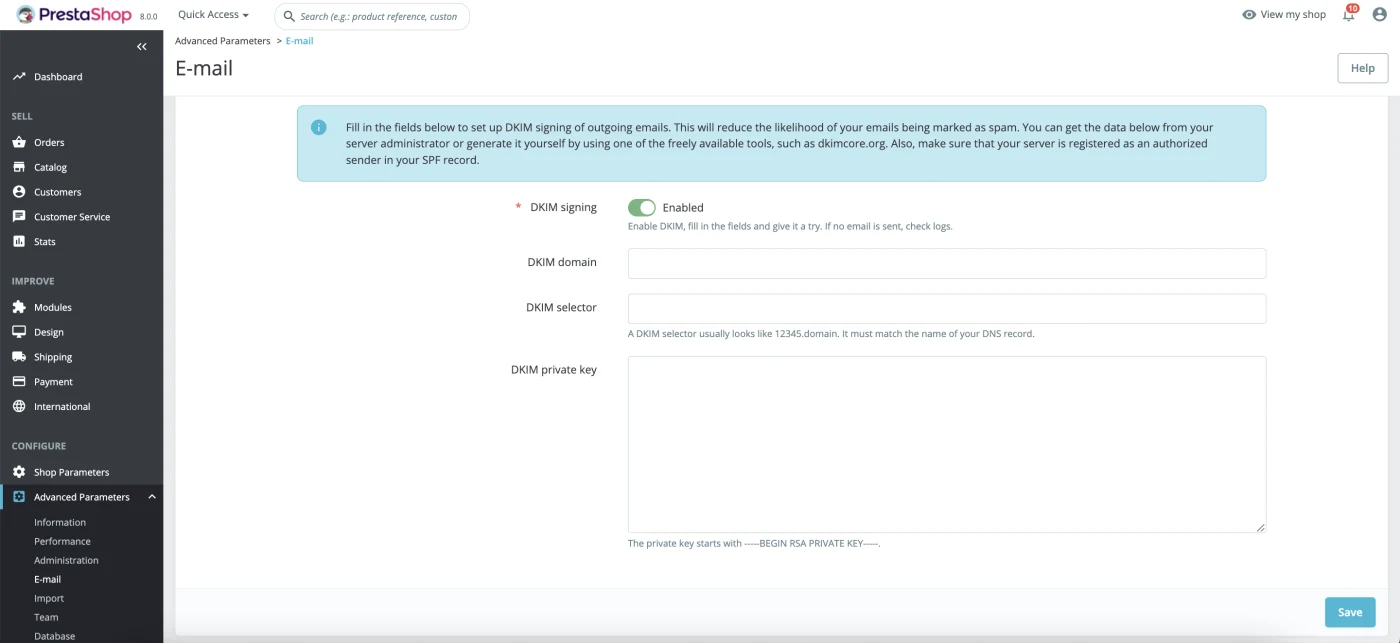
PrestaShop 8 email settings include DKIM signing with a domain, selector and private key. Check which system actually sends each message before changing these settings: configuring the shop does not replace authentication in another provider. The screenshot shows where these fields are defined in PrestaShop.
A pre-launch validation protocol
Use this list to agree what “ready” means. Test with internal contacts and controlled data, documenting limits that cannot be reproduced in the test environment.
- Identify version, module, connected shops and owners.
- Check subscription, unsubscribe and preferences at the capture points in use.
- Compare historical examples with activity after connection.
- Create an order and follow changes without duplicating its purchase meaning.
- Test cancellation, return and pending payment where relevant.
- Check language, currency, catalogue, variant and link destinations.
- Validate visible prices and tax treatment with concrete examples.
- Confirm one sender and one receipt for each operational notice.
- Test conditions that prevent or stop a marketing message.
- Agree stop criteria, an owner and the configuration to restore.
The outcome should be a record of cases and decisions, not a “connected” screenshot. If a critical check remains open, limit activation to validated journeys. An audit can prioritise gaps by impact and dependency.
Maintenance and measurement in context
Work continues when the catalogue, modules, checkout or commercial rules change. Define changes that require a repeat test and who will notify the email team. A small, current inventory is often more useful than extensive documentation nobody maintains.
Compare performance by shop and journey using consistent order and revenue definitions. Check before adding metrics that may describe the same sale. The email metrics guide separates activity, attribution and business outcomes.
When budgeting, distinguish initial integration, content, automations, campaigns and technical coordination. More shops or languages can increase validation work even on one platform. An email marketing service should specify deliverables, maintenance and responsibilities.
For handover, leave sample data, language and price decisions, owners and incident procedures. The team should be able to investigate an incorrect message without reconstructing the entire setup.
Sources and further reading
AI-assisted translation
Article by Dídac Anton. The English, German, Dutch and French versions were translated from Spanish with the help of AI.
Read the Spanish originalRecommended articles

Post-purchase email sequence
Connect the post-purchase experience to useful information, reviews and future purchases while respecting the real order status.

Ecommerce email marketing guide
A practical ecommerce email guide: what to build first, how the pieces connect and what to measure at each stage.

Klaviyo email marketing agency
Connect Klaviyo to your store and turn customer data into segments, flows and campaigns with a clearly defined scope.