
WooCommerce email marketing agency
Implement WooCommerce email marketing with a validated integration and clear maintenance responsibilities.
 By Dídac Anton
WooCommerce email marketing: locate each responsibility
The store, extensions, hosting and email platform may all participate in a WooCommerce journey. When a message fails, identify where the process stopped. Changing templates or installing another plugin without locating the failure can introduce duplication and make diagnosis harder.
WooCommerce uses WordPress wp_mail() by default to hand messages to the sending system. Its documentation distinguishes message generation from eventual receipt.
Organise the project into store data, integration, communication rule, content and sending. Identify who can inspect evidence and make changes at each layer. This gives an email marketing audit a basis for assigning concrete fixes.
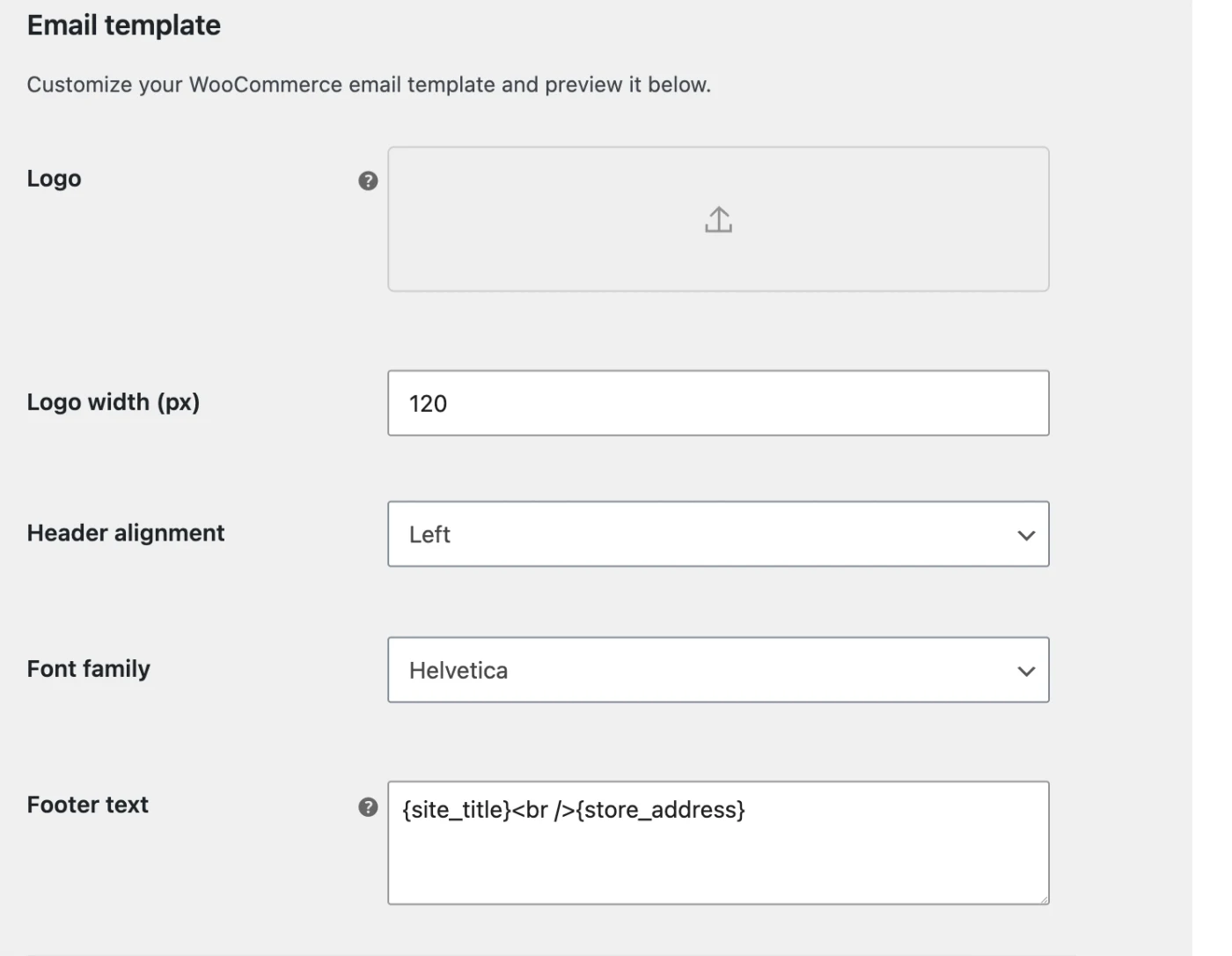
WooCommerce email settings also include the logo, alignment, font and footer text. Review these settings for messages generated by the shop and keep their visual identity consistent with campaigns in the marketing platform. Changing the design does not fix a delivery failure.
A matrix for deciding where to investigate
Before intervening, record the expectation, observed outcome and a reproducible case: order, contact, time and affected message. Use test data or evidence limited to diagnosis. Explaining an incident does not require copying the entire customer database.
This matrix proposes an investigation sequence. A signal guides the next check; it does not automatically establish the cause:
| Observed situation | Next check | Responsibility to clarify |
|---|---|---|
| Order missing from the email platform | Compare the store record with that case’s sync. | Integration and technical maintenance. |
| Order exists, but the contact does not enter | Review conditions, identity and exclusions. | Automation owner. |
| Contact enters, but no message is sent | Check wait, eligibility and message state. | Channel operations. |
| Message sent, but not received | Review provider outcome and recipient delivery. | Sending provider and deliverability. |
| Email arrives with incorrect data | Compare content, variables and event data. | Content and integration. |
| Two equivalent communications arrive | Identify the system that issued each one. | Store and marketing coordination. |
Do not change several layers at once. A scoped change and a repeat of the same case help establish whether the hypothesis was correct. For receipt problems, extend the investigation with the deliverability guide.
Extension, connection and compatibility
Klaviyo integration requires installing its WooCommerce extension and enabling the connection in Klaviyo. The documentation states that this extension supports HPOS, High-Performance Order Storage.
Record WordPress, WooCommerce, extension and theme versions, plus components changing checkout. Verify the actual combination. One extension supporting HPOS does not prove compatibility for every store customisation.
Klaviyo’s troubleshooting guide identifies possible interference from caching, redirects and access controls. Investigate the specific error before changing configuration.
For conflict testing, agree an appropriate environment and window with the technical owner. Do not indiscriminately disable security, caching or extensions on the trading store. Retain the previous setup, change and rollback criterion. The Klaviyo guide covers data and messaging work once connected.
Validate orders, states and products
Build a sample representing the store: new order, pending payment, cancellation, return, variant product and existing customer. For each, specify what marketing needs to know and which communication must be avoided.
This table proposes a comparison protocol, not a list of fields guaranteed by every connector. Verify available names and states in the selected integration.
| Data | Test question |
|---|---|
| Order identifier | Does an update change the same order or create a duplicate? |
| State | Does a cancellation still count in the condition being used? |
| Date | Are the timestamp and timezone interpreted correctly? |
| Product and variant | Do content and links match the purchased item? |
| Amount and currency | Are discounts, tax and shipping distinguished where needed? |
| Contact | Is activity assigned correctly without altering preferences? |
Different totals warrant investigation, but matching totals do not validate every record. Keep historical and post-connection examples. If data is missing, adjust the journey’s scope instead of pretending it is available.
Turn data into useful journeys
For cart recovery, verify the recorded action, when it can be associated with a contact and how a later purchase is detected. Return people to the correct context and stop when the message is no longer relevant. Having an address is not permission for every communication.
For post-purchase, separate operational notices from helpful follow-up content. Usage guidance may need delivery confirmation; complementary recommendations should account for the product and support issues. Define purpose before timing.
Imagine a fictional spare-parts shop with orders awaiting manual payment. Treating every pending order as completed could trigger recommendations prematurely. The right rule depends on the shop’s real process and requires a representative test.
Document entry, wait, exclusions, exit and re-entry for each sequence. Review concurrent campaigns and other extensions’ notices. A simple journey with reliable data is easier to maintain than many branches built on ambiguous states.
An integration change needs an end-to-end test
Prepare controlled cases before changing the trading environment and prevent test systems from contacting real customers. Test environments may differ in payment, scheduled tasks or connections. Record those differences instead of treating all operations as proven.
- Record versions, previous configuration and validation owner.
- Test signup and unsubscribe through the forms and checkout used.
- Create and update an order without duplicating its activity.
- Compare relevant cancellations, returns and variants.
- Check sequence entry and exit with a purchase during a wait.
- Review links, language, currency, images and missing personal data.
- Confirm that systems do not duplicate order notices.
- After the change, repeat permitted production checks using internal contacts.
- Define which result requires stopping activation or restoring the earlier setup.
Record what was tested and what was not. “Plugin active” describes installation; it does not prove that purchase and communication work together.
Maintenance, cost and monitoring
An ecommerce email marketing service must coordinate with the WordPress and WooCommerce maintenance owner. Clarify incident responsibilities and notification of theme, checkout, extension or hosting changes. Not every email issue belongs to the copywriting team.
Separate platform, licences, integration, content and monitoring costs. Include reviews and tests after updates. A cheaper quote may exclude work the store still needs; compare equivalent scope.
Use consistent definitions of orders, returns and attributed revenue. The metrics guide helps interpret store/platform differences without double-counting sales. Include unsubscribes, incidents and manual work.
Leave a dependency inventory and concise diagnostic procedure. Continuity depends on detecting and correcting changes in data, rules and content, not merely keeping a plugin installed.
Sources and further reading
AI-assisted translation
Article by Dídac Anton. The English, German, Dutch and French versions were translated from Spanish with the help of AI.
Read the Spanish originalRecommended articles

Klaviyo email marketing agency
Connect Klaviyo to your store and turn customer data into segments, flows and campaigns with a clearly defined scope.

Ecommerce email marketing guide
A practical ecommerce email guide: what to build first, how the pieces connect and what to measure at each stage.

PrestaShop email marketing agency
Connect PrestaShop to email while accounting for modules, languages, currencies and data quality.