
Mailchimp email marketing agency
Organise Mailchimp audiences, journeys and campaigns around the real needs of your ecommerce business.
 By Dídac Anton
What Mailchimp should solve for an online store
A Mailchimp ecommerce project needs more than a newsletter template. It must connect store information with a usable audience, a content plan and sending rules. Start with a specific problem: disorganised contacts, inconsistent campaigns, an incomplete welcome series or orders that do not appear correctly.
When assessing an agency or specialist, ask for deliverables: which integration they will review, which data they will validate, which messages they will prepare and which tests they will record. Account setup, email design and ongoing campaign management are different jobs. Separating them helps identify what your team can own and where it needs support.
This guide proposes a practical order for configuring and reviewing Mailchimp. Content choices and test cases are operational recommendations; confirm specific features in the account and the documentation for the connector you use.
A signup form is not an ecommerce integration
Mailchimp distinguishes connecting a website for forms from syncing ecommerce data. A basic website connection does not itself include ecommerce tools; its integration documentation explains this distinction.
Before building a purchase-based sequence, use a test order to establish what actually arrives. Seeing the store listed as connected is insufficient. Record the order identifier, date, products and linked contact, then compare them with the store. Separate historical records from newly generated events.
For Shopify, Mailchimp recommends pausing existing welcome automations before connecting and preparing fresh copies afterwards to avoid redundant welcomes to synced customers. Review that dependency before starting the connection.
If orders are duplicated or a category is missing, fix the integration before building conditions around that data. Otherwise, every campaign or automation using it can inherit the error.
Organise the audience without treating every contact as a subscriber
Shopify’s initial sync and subsequent updates follow different rules. Mailchimp documents how subscription states transfer; review conflicting states between the accounts before connecting them.
Create a small data dictionary: field name, meaning, source, format and owner. Preferred language, shipping country and billing country are different things. A missing value should not silently become a preference chosen by the person.
For an import, separately define marketing eligibility, unsubscribes to preserve and records with an unclear source. Do not turn an entire customer export into subscribed contacts. Test a sample, retain the previous state and check how an existing contact would be updated.
A useful structure answers real questions instead of accumulating ownerless tags. The segmentation guide explains how each condition should support a communication decision.
| Data to review | Validation question | Mistake to avoid |
|---|---|---|
| Contact source | Which form, purchase or import created it? | Losing acquisition context. |
| Subscription status | Is this contact eligible for this message type? | Treating a purchase as marketing signup. |
| Language | Is it a confirmed preference or an assumption? | Choosing a language from an empty field. |
| Order history | Have dates, products and duplicates been checked? | Segmenting from incomplete history. |
| Tags and fields | Who updates them, and when do they expire? | Keeping labels that no longer describe the contact. |
Turn purchase data into relevant messages
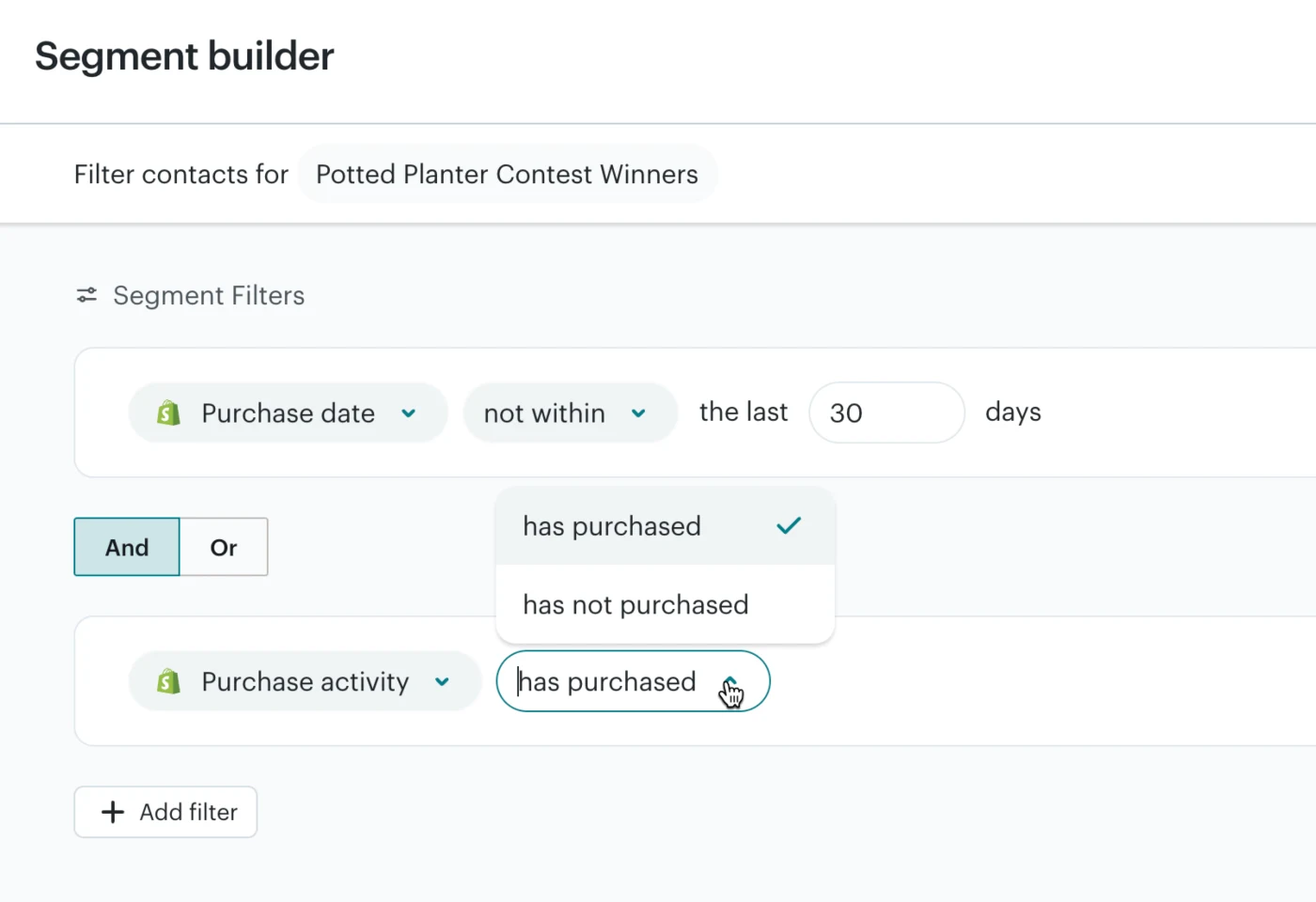
Mailchimp supports segments based on purchase activity, products, dates and amounts when the required data exists. Available conditions depend on the integration, so verify them before specifying a segment.
Consider a fictional hiking shop. A campaign might teach jacket buyers how to care for their purchase instead of offering the same garment to everyone again. That proposal changes if the order was returned or the customer reported a defect.
Write the rule in plain language first: recipients, purchase period, relevant product and exclusions. Then check contacts that should qualify and others that should not. If the sample disagrees, review the source data and logic before expanding the send.
Avoid tiny segments without a meaningful difference in content. Writing, reviewing and maintaining many variants may cost more than they contribute. A clear hypothesis and reliable data are more useful than a collection of hard-to-explain filters.
Campaigns, welcome and recovery require different briefs
A campaign responds to a date or commercial priority; a welcome responds to signup; recovery depends on an unfinished purchase. Before running them together, decide which communication takes priority and how repetition will be prevented.
Campaign management needs a calendar stating product, audience, message, date and approver. Copy and design turn that brief into a readable email with one main action and content that still makes sense when personal data is missing.
For the welcome sequence, check the signup promise and what happens if someone buys before completing the series. For cart recovery, verify the abandonment event, the route back to purchase and the rule that stops further reminders after payment.
Do not decide the email count before understanding buyer questions and the team’s maintenance capacity. Give every message a purpose. If two emails address the same objection without adding useful information, simplify them.
What to check before accepting the work
Validation should follow a complete journey with test contacts. An editor preview does not prove that the right person receives the correct links at the intended time. Record the cases tested, the version and any unresolved limitations.
This is a proposed project acceptance checklist, not an automatic performance guarantee:
- A test signup retains the expected source, language and subscription state.
- A test unsubscribe is excluded from the relevant marketing send.
- A new order links to the correct contact and products without duplication.
- Included and excluded recipients match the approved brief.
- Missing names and unavailable products have valid fallbacks.
- Links reach the intended page and language; promotion terms are visible.
- Mobile reading, alternative text and blocked images have been reviewed.
- Two systems are not sending the same notification to the buyer.
- The team knows who may publish, pause and correct each communication.
Budget, maintenance and interpreting results
Separate platform cost from integration, content and ongoing review. Before accepting a quote, confirm current plan features and limits, expected contact and sending volumes, included revisions and ownership of catalogue changes. A price without scope does not support a fair comparison.
Keep an inventory of audiences, fields, forms, templates and automations with named owners. After a store theme, connector or commercial policy changes, repeat the affected tests. Maintenance means more than creating the next newsletter.
Compare equivalent periods and audiences when reviewing campaigns, and document purchase attribution. Revenue associated with a message does not prove that all those sales were additional. Include unsubscribes, incidents, returns and operational work when deciding what to retain, improve or stop sending.
Sources and further reading
AI-assisted translation
Article by Dídac Anton. The English, German, Dutch and French versions were translated from Spanish with the help of AI.
Read the Spanish originalRecommended articles
Shopify email marketing agency
Connect Shopify to an email strategy with validated data, markets and automations before launch.
Abandoned cart email sequence
Examples, logic and decisions for a relevant, measurable abandoned cart sequence that does not always rely on discounts.
Ecommerce welcome email sequence
Design a welcome journey that delivers on the signup promise and reflects each subscriber’s actual customer stage.